The Ultimate Remote Work Ergonomics Guide
How to Protect Your Spine and Joint Health at Home
How’s working from home going? If you are reading this, chances are you are still working from home, navigating the unique balance of remote professional life. For some individuals, working from home is their preferred option — a brilliant chance to see their family more frequently, enjoy a more relaxed work environment, and reclaim autonomy over their daily schedules. For others, however, it can feel quite daunting and present itself as an immense logistical challenge.
Regardless of which camp you fall into, one thing is certain: remote work drastically alters your physical relationship with your workspace. Think about your daily habits. If you add up all the time saved by simply not sitting in a car commuting to work every morning and evening, you will quickly start to see the massive potential this lifestyle offers. Working from home has many distinct positives and can provide you with great overall flexibility. When we talk about flexibility from a physiotherapist's perspective, we mean it literally—you are structurally able to get up, stretch, and move your body far more often than you ever could in a rigid corporate office.
However, this flexibility is a double-edged sword. Without someone auditing your desk setup, it is incredibly easy to fall into poor postural habits. To safeguard your musculoskeletal health, it is fundamentally important to have a comfortable, anatomically correct set-up to avoid neck tension, back pain, stiff joints, and even referred knee pain. To begin with, you need to deliberately create a functional, temporary work environment at home rather than just working off whatever surface is closest. Thankfully, transforming your space shouldn’t be difficult if you follow a few key, evidence-based principles.
The Biomechanics of a Perfect Workstation
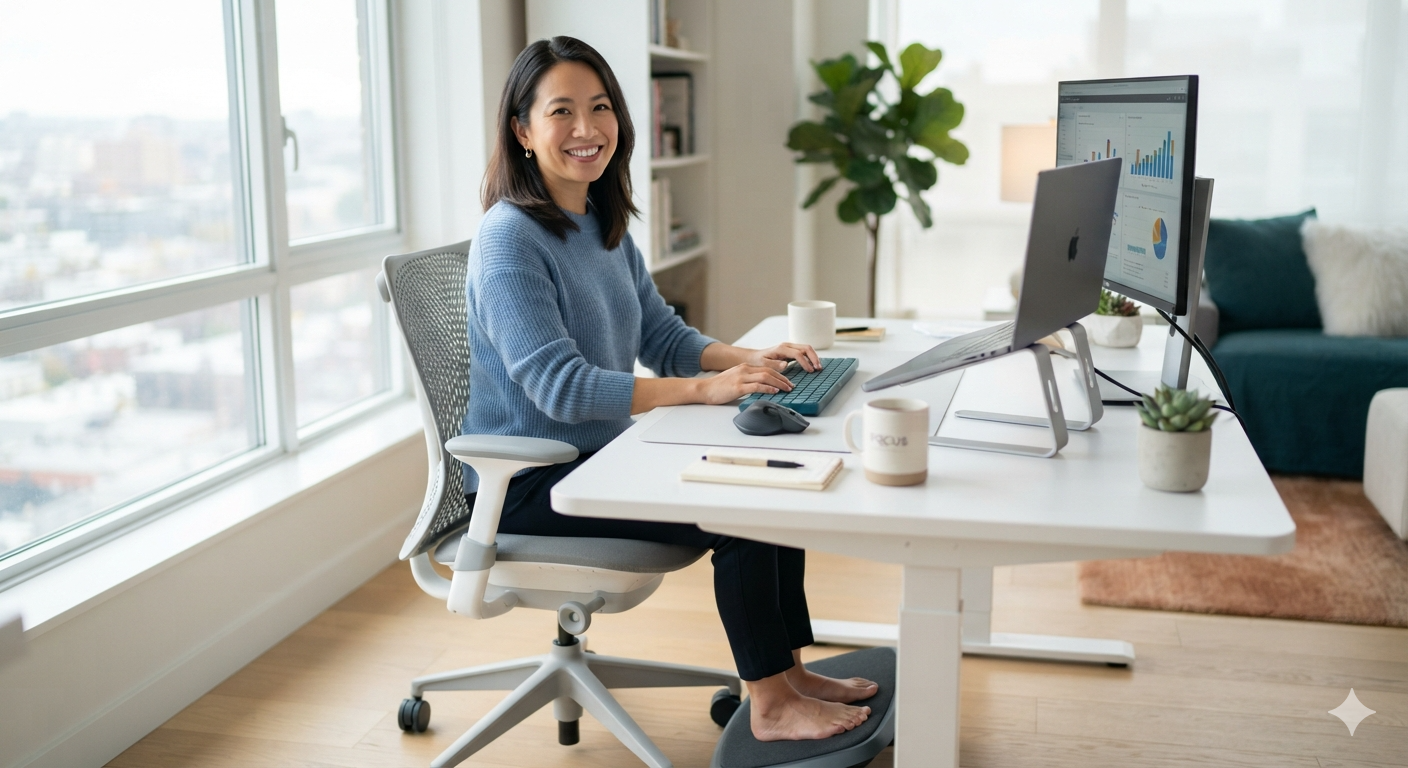
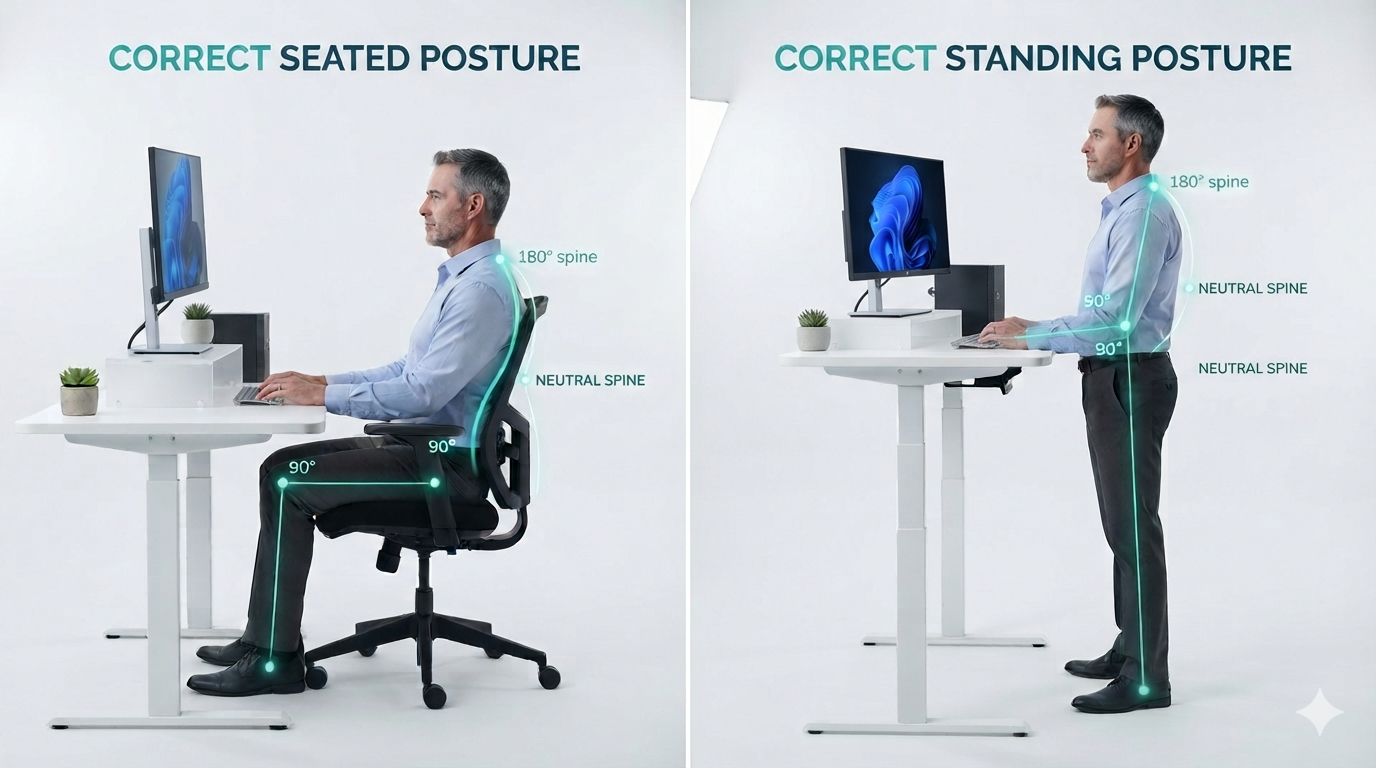
When arranging your remote workspace, your primary goal is to maintain a neutral spinal alignment. This reduces the mechanical load placed on your intervertebral discs, ligaments, and surrounding musculature. Ideally, your setup should feature an adjustable design that accommodates both sitting and standing options throughout the day.
To optimize your workstation anatomy, systematically cross-reference your current desk setup against these three vital physiological rules:
1. Visual Alignment and Screen Height
Your digital screen must be positioned approximately in line with your eyes, and it should never be placed too close to your face. When a screen is positioned too low, your cervical spine is forced into chronic flexion, drastically increasing the relative weight of your head on the delicate muscles of your neck. Keeping the screen at eye level ensures you maintain a neutral cervical gaze.
2. Upper Extremity and Shoulder Mechanics
Your elbows and hands should rest at about the exact same height, with your elbows resting comfortably close by your side. Achieving this relaxed arm position may require you to deliberately raise or lower the height of your chair relative to your desk. When your elbows are supported and your shoulders remain un-shrugged, you greatly reduce your overall chance of developing chronic neck and shoulder pain.
3. Pelvic Stabilization and Lower Limb Support
Your feet need to rest firmly on something solid. If your chair height prevents you from reaching the floor completely, you must bring in a small box or a dedicated footrest to enable your lower legs to be more relaxed. Properly supported legs provide a stable foundation for the pelvis, which will directly help prevent lower back pain. Additionally, pay close attention to how your pelvis interacts with the seat. Try sitting tall and consciously feel the physical weight resting on your hard sitting bones (the ischial tuberosities) rather than slouching back onto the soft flesh of your bottom.
The Remote Work Ergonomic Checklist: Do's vs. Don'ts
Building a healthy routine requires drawing clear structural boundaries in your home environment. You are always welcome here at our clinic and we absolutely love seeing you in person; however, if you want to actively avoid an urgent, painful visit to Beechboro Physio, try following this comprehensive checklist to manage your daily loads.
Do
Create a permanent workspace which will not become your child’s toy storage area.
Stand up at least every 30 minutes, walk around the room, and stretch your arms above your head. Schedule regular standing activities, such as making every phone call while standing.
Find a suitable work chair – this may be an ergonomic office chair or a tall-back dining chair.
Take active breaks from work – such as walking your dog or your child. They will both bark and fuss less with some regular outdoor exercise.
Use a desktop computer, or if using a laptop, attach a separate keyboard and mouse while elevating your screen to be in line with your eye height.
Have a customized home exercise program (we can help you design that!) filled with targeted neck and back stretches.
Don’t
Slouch over your low laptop screen, compressing your chest and cervical spine.
Sit on your couch, bed, or the hard floor while you try to execute your professional work.
Constantly shift your setup around the house to suit your family's moving schedules.
Shift from your workstation straight to the couch or outside to have your lunch break without moving your joints.
Sit down at your computer for hours on end without shifting your posture or moving.
Forget to stretch and exercise, allowing your postural muscles to weaken and tighten over time.
Top 3 Ergonomic Exercises for Remote Workers
If you are working from home, then you must remember to give yourself dedicated time to stretch regularly. We highly recommend taking a break at least once during every single work day to give yourself ten full minutes to stretch out your musculoskeletal system. To be completely honest, even if you are currently heading back to a traditional corporate work office, you still need to find dedicated time in your day to perform these therapeutic stretches.
Incorporate these three targeted exercises into your daily routine to combat postural fatigue:
1. The Seated Thoracic Extension
Why it helps: Counteracts the forward slouch caused by typing and opens up the chest.
How to do it: Sit tall with your weight balanced on your sitting bones. Interlace your fingers securely behind your head. Gently arc your upper back backwards over the top edge of your chair while keeping your lower back stable. Hold the gentle stretch for 15 seconds. Repeat 5 times.
2. The Upper Trapezius Release
Why it helps: Relieves accumulated neck and shoulder pain from looking at monitors.
How to do it: While sitting upright, lower your right ear toward your right shoulder. For a deeper stretch, place your right hand gently on top of your head to guide it down, while reaching your left arm toward the floor. Hold for 20 seconds, switch sides, and perform 3 repetitions per side.
3. The 30-Minute Standing Sky Reach
Why it helps: Resets the spine, stretches the abdominal wall, and expands lung capacity after prolonged sitting.
How to do it: Stand up completely. Place your feet hip-width apart, interlace your fingers, turn your palms upward, and stretch your arms high above your head. Reach as high as you comfortably can while taking three deep, slow belly breaths. Lower your arms and repeat this every time you finish a phone call or stand up.
Visual Guidance: To help you visualize the correct movement patterns for these exercises, here is a highly instructional video of some clinical stretches you might find incredibly helpful to integrate into your workday : Watch the Guided Stretching Video on YouTube.

Establishing an Active Routine in Perth
Working from home will ultimately provide you with more open time across your week, so it is vital that you make the absolute most of it. Use the hours you save on the road to establish a healthy lifestyle. Set yourself a firm, consistent work routine, and make a commitment to be physically active every single day.
Being active does not just safeguard your physical frame; it also stimulates endorphins that help you feel genuinely happy while helping you completely avoid unnecessary physical issues such as stiff joints and chronic back pain. Look after your body, move deliberately, and enjoy the true flexibility of your remote setup.
As always, if you have any further queries about your ergonomics or want a personalized exercise routine, feel free to give us a call on 9377 2522—we’d be more than happy to have a chat.